
Creating a Park & Stride map
Our guide provides you and your pupils with ideas to create and promote a Park & Stride map for your school. Download a PDF version of our Guide to creating and promoting a Park & Stride map at your school.
Why encourage people to Park & Stride?
We know that, for many reasons, not everyone can walk all the way to school every day. For those that need to drive some of the way, some of the time there is Park & Stride. This encourages families not to drive right to the school gates to drop off but to park a little further away and walk or scoot the last 5-10 minutes. Some of the benefits of walking even some of the way to school are:

5-10 Minute Walking Zone
A walking zone is an area around a school within which families are encouraged to walk, scoot or cycle – but not drive – to school. This makes for happier, healthier children, less congestion and stress for parents and better air quality for everyone at the school gates.
How to set up a Walking Zone
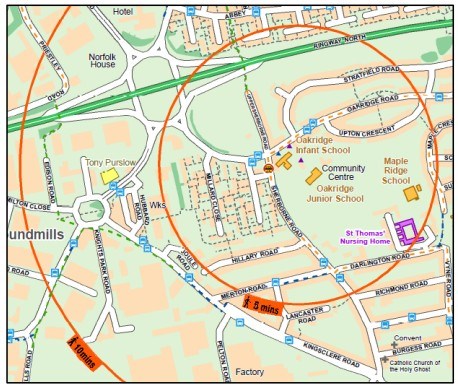
To work out where your walking zone is, with your teacher or responsible adult, walk around the streets nearest your school. Time where you get to when you walk in a roughly straight line along a pavement for five minutes. Do the same for 10 minutes and in several directions. Then you can mark out an approximate 5-10 minute walking zone. Here is an example from Oakridge in Basingstoke:
Creating your map
Use a mapping programme to get an image of the area outside your school. Some very clear mapping is available at openstreetmap.org which you can edit too if you register. Save this map onto a Word document.
Once you have worked out roughly where your walking zones are, draw them out on your map using circles as above. Then, look out for safe places for parents to park outside the five minute walking zone and mark these on the map. Search on the internet for suitable icons to use and note them in a key on your map. You should write a letter, phone or visit the owner of any car park you wish to recommend to check that they are happy for parents to park there. If there is usually a charge to park, the owners may be persuaded not to charge drivers for parking where there for a short time whilst dropping off if they display a permit. The School Travel Plan Team can
provide car windscreen stickers for this purpose or you can design your own.
Adding other features to your map
As well as car parks, you might also want to note other points of interest near the school like bus stops, school crossing patrols, other safe crossing points, playing fields and playgrounds. Inside the school grounds you could mark the location of entrances – pedestrian and vehicular - and the location of any scooter and cycle storage. Ask your parents and the school staff if they know of anything else that could be added.
How to tell parents what you want them to do
It is useful to specify on your map what you want parents to do, such as:
- walking, scooting and cycling to school for a healthy, sociable and environmentally friendly start to the day
- not come right to school in cars but park further away
- park safely and not blocking driveways or on kerbs
- always leave space for an emergency vehicle to get past
- use Park & Stride car parks if they have to drive
- recommend car sharing or parking on a friend’s drive and walking to school with them
- ask for children to dismount scooters and bikes on the school site
- are dogs allowed on the school site or can they be tied up somewhere nearby?
You also need to tell them why you want them to do it:
- to reduce congestion and improve pedestrian safety and air quality near the school
- What else? Is there a specific problem at your school that you need to highlight?
Launching your Park & Stride Map
There are many ways in which to launch your map to your peers in school and to the whole school community. Once you have finished editing your map, save it as a pdf file so that it can’t be changed. Then try one or more of the following ideas, or some of your own:
- Make a Travel to School page on your school website and put the map and instructions on there
- Ask the school office to email the map to parents with a message on ParentMail
- Write an article for your school newsletter and tell parents where to find the map
- Print the map out and give everyone a copy to take home
- Tell everyone about the map in a whole school assembly
- Run a ”Be Bright Be Seen” Day, “Green Travel” Day or “Bling your Bike and Scooter” Day
- Make a film showing how easy it is to walk from your Park & Stride car parks, show the film in assembly and post it on the school website
- Run a competition to design a Park & Stride windscreen permit for cars or a slogan for a Road Safety banner
- What else can you think of?